Operationalizing Back-Office Bot Resilience
Deploying software automation across enterprise systems often starts with an initial burst of productivity. Operations teams rapidly automate manual data entry, cross-system copy-pasting, and reconciliation routines. However, as organizations scale their reliance on robotic process automation (RPA), fragile scripts frequently collapse under edge cases, unexpected UI changes, or legacy system outages. When workflow bots fail silently, operations teams face backlogs, compliance breaches, and lost productivity.
Achieving enterprise-grade reliability requires shifting from quick scripting to process engineering. High-availability workflow bots depend on rigorous process screening, structured exception handling, real-time observability, and clear escalation protocols. For organizations refining their automation strategy, Bitscaled provides end-to-end RPA solutions that turn fragile UI scripts into resilient, enterprise-class automation assets.
Process Selection Criteria: Screening for High-Yield Bot Execution
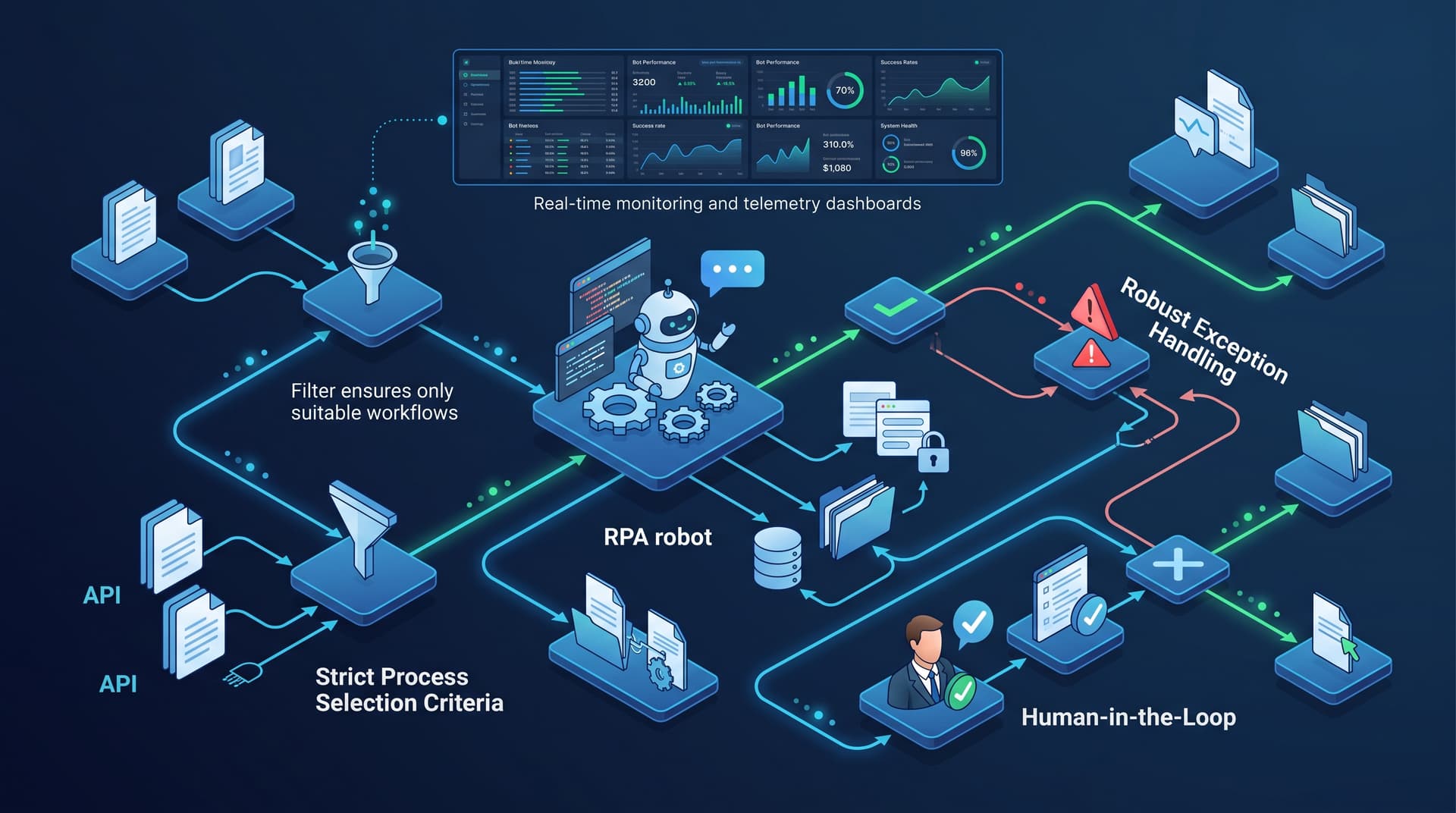
Not every manual process should be automated with software bots. Selecting the wrong candidate workflow leads to elevated maintenance overhead, frequent runtime failures, and negative return on investment. Operations managers must evaluate processes against strict engineering metrics before allocating development resources.
A high-yield candidate process displays four fundamental characteristics:
- Deterministic Business Rules: The workflow relies on binary decisions, defined lookup tables, or strict logical conditionals. Processes requiring subjective discretion or dynamic human evaluation are unsuitable without structured rule-mapping.
- Standardized and Digital Inputs: Inputs must consist of structured or semi-structured data formats—such as standardized PDFs, CSV spreadsheets, direct database records, or structured email forms.
- High Volume and Execution Frequency: Processes executed hundreds or thousands of times weekly generate the highest operational yield, justifying initial process mapping and testing efforts.
- Stable Target Applications: Core software applications (ERP systems, legacy desktop apps, web portals) should have stable interfaces and scheduled maintenance windows to prevent unexpected UI changes from breaking bot selectors.
| Selection Metric | Preferred Profile (High Suitability) | Red Flag Profile (Low Suitability) |
|---|---|---|
| Input Structure | Structured spreadsheets, digital forms, database feeds | Unstructured handwritten notes, freeform emails |
| Rule Determinism | Explicit IF-THEN logic, standardized decision tables | Subjective judgment, context-dependent evaluation |
| System Stability | Stable legacy desktop UI, established cloud web apps | Weekly UI layout overhauls, unstable beta web portals |
| Process Cadence | Daily or continuous batch execution | Low-frequency ad-hoc execution (once per quarter) |
By filtering candidates through these criteria, operations teams insulate their automation portfolio from unnecessary brittle implementations.
When NOT to Use RPA: Identifying Anti-Patterns
Robotic process automation excels at bridging legacy software environments where direct API integrations are missing, cost-prohibitive, or technically impossible. However, forcing RPA into every automation scenario is a common process design anti-pattern.
1. API-Accessible Modern Applications
When target systems expose stable, well-documented REST or GraphQL APIs, direct API integration or modern webhooks should always take precedence over UI-level bot automation. API integrations operate faster, consume fewer computing resources, and remain unaffected by front-end design updates. UI-based workflow bots should be reserved for legacy platforms, terminal emulators, or third-party web portals lacking API exposure.
2. High-Frequency Volatile UI Environments
Attempting to deploy screen-scraping bots onto target platforms undergoing active, unannounced visual redesigns results in persistent bot failure. If an application updates DOM element IDs or visual layouts weekly, maintaining selector maps creates unsustainable operational debt.
3. Highly Ambiguous or Unstructured Decision Chains
Processes requiring human empathy, creative judgment, or contextual negotiation cannot be reliably automated with deterministic RPA logic. Attempting to hard-code complex human negotiation into conditional statements results in fragile scripts that constantly hit unhandled exception pathways.
Takeaway: Use RPA to bridge legacy gaps and unify disparate software screens. Never substitute UI automation for native API integrations or human cognitive discretion.
Engineering Exception Handling and Self-Healing Workflows
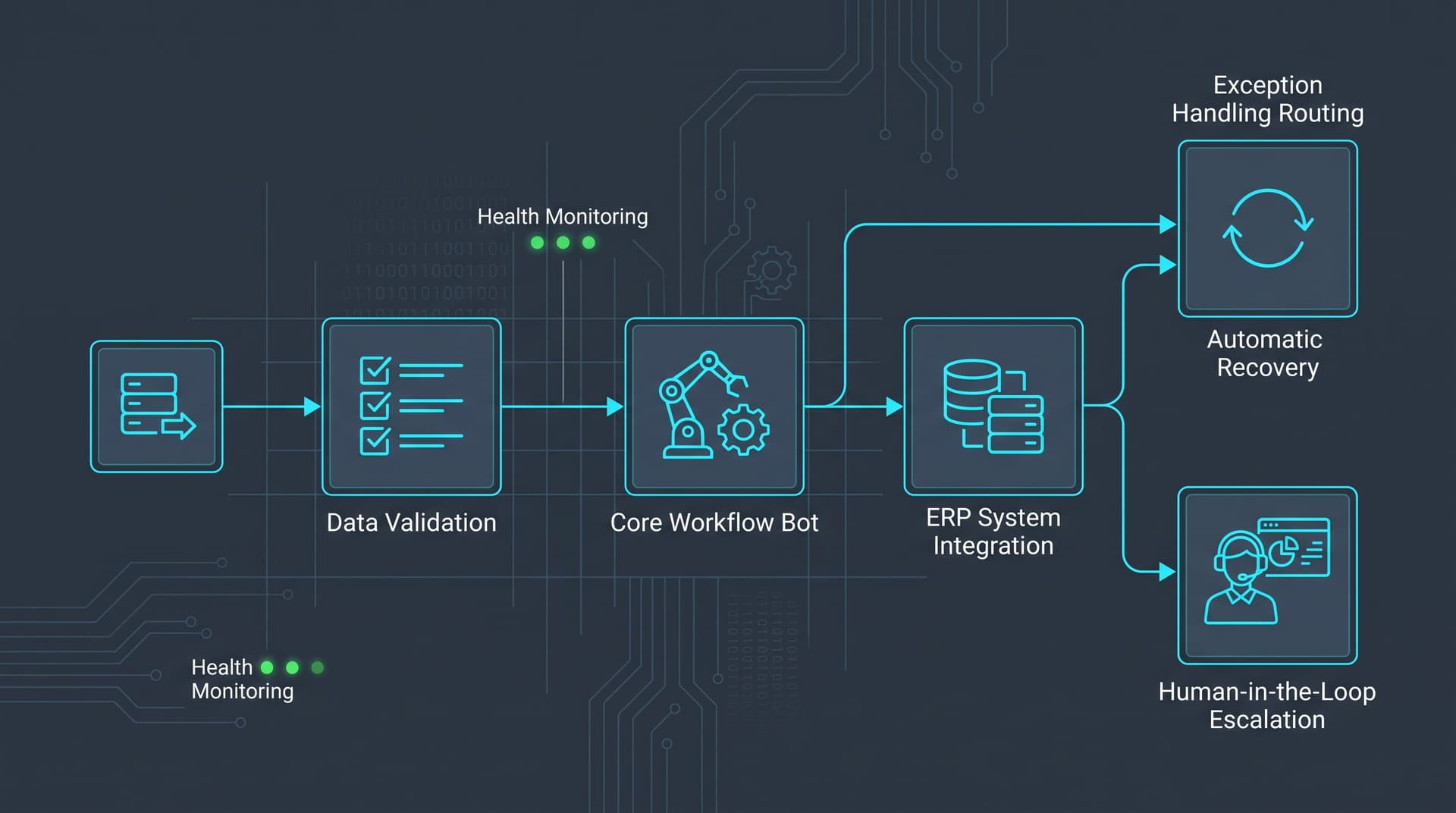
Runtime exceptions are inevitable in enterprise IT environments. Network blips, system maintenance pop-ups, slow database queries, and invalid input data will interrupt execution. Resilient RPA architecture distinguishes between two primary exception classes and handles each programmatically.
System Exceptions
System exceptions stem from environmental infrastructure issues—such as a target ERP application failing to load within a designated timeout window, a disconnected VPN session, or an unexpected pop-up modal.
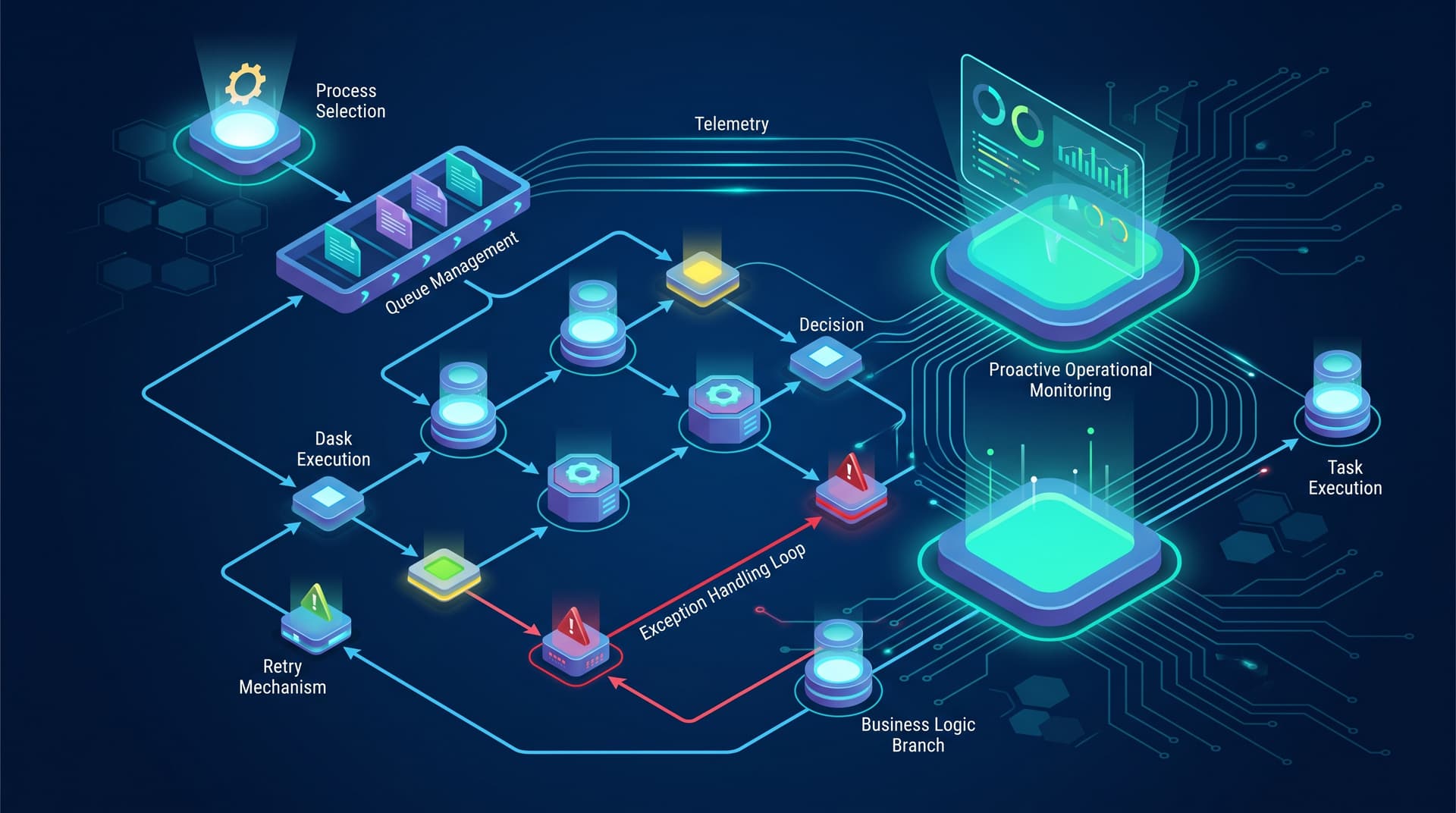
- Recovery Mechanism: Implement exponential backoff retry policies. The bot captures a screenshot, logs environment telemetry, closes background process handles, re-authenticates to the target application, and attempts the item again up to a defined threshold (e.g., 3 retries).
- Self-Healing Selectors: Utilize multi-anchor UI element selectors. If a primary XPath or DOM ID changes, the bot falls back to visual anchor elements or accessibility attributes to complete field interaction without crash.
Business Exceptions
Business exceptions occur when execution hits valid logical edge cases—such as an invoice total exceeding purchase order authorization, a missing tax identification code, or an unrecognized vendor ID.
- Recovery Mechanism: Business exceptions are not operational failures; they are intentional logic branches. The bot must flag the transaction in the queue, assign a specific status code, log the transaction data to an audit ledger, and automatically assign an exception item to an operations manager for manual review.
- Isolation: A single business exception must never abort the entire batch job. The bot isolates the failing record, notifies the task owner via secure notification, and proceeds immediately to the next item in line.
Operational Monitoring and Telemetry
Maintaining operational health across dozens of active workflow bots demands real-time monitoring and centralized log aggregation. Treating bots as virtual workers requires tracking performance metrics similar to human workforce management, combined with technical IT service metrics.
Key telemetry parameters include:
- Heartbeat Monitoring and SLA Tracking: Automated monitoring dashboards track bot runtime activity. If a scheduled bot fails to issue a heartbeat within its expected time slot, automated alerts trigger incident tickets on Bitscaled's monitoring dashboard.
- Throughput and Cycle Time: Tracking processing time per item helps detect degradation in underlying application responsiveness before hard timeouts occur.
- Exception Rate Trends: Spikes in business exceptions often indicate upstream process changes (e.g., a vendor altering invoice layouts), whereas spikes in system exceptions point to underlying IT infrastructure instability.
- Comprehensive Audit Trail: Every keystroke, click, data extraction, and transaction log must be cryptographically hashed and stored in secure audit logs for compliance in regulated sectors like financial and professional services.
Workflow Transformation: Before and After Accounts Payable Automation
To visualize the practical impact of resilient bot engineering, consider an Accounts Payable (AP) invoice processing workflow within a mid-sized logistics firm.
Before: Manual Accounts Payable Processing
- Receipt: Vendor emails an invoice PDF to the central AP inbox.
- Manual Review: An AP specialist opens the email, downloads the attachment, and manually checks for duplicate invoice numbers in the accounting portal.
- Data Entry: The specialist manually transcribes invoice fields (PO number, line items, tax, total amount) into the enterprise ERP system.
- Validation & Matching: The specialist opens a separate warehouse management system to confirm goods receipt and verify that PO line items match invoice totals.
- Approval Routing: If matched, the specialist submits the transaction for payment; if mismatched, they draft an email to procurement.
Operational Pain Points: High error rates during manual transcription, long processing cycle times (15–20 minutes per invoice), severe backlogs during end-of-month financial closing, and lack of immediate visibility into processing status.
After: Engineered RPA Workflow Execution
- Automated Ingestion: A dedicated workflow bot monitors the secure AP inbox, extracts PDF attachments, and parses structured line items using optical character recognition (OCR) and regex pattern matching.
- System Search & Deduplication: The bot queries the ERP system via secure database connector or UI automation to verify that the invoice number has not been processed.
- Cross-System Matching: The bot connects to the warehouse portal, cross-references line items and totals against purchase order receipts, and applies automated validation rules.
- Automated Posting & Exception Isolation:
- Match Success: The bot enters details into the ERP, creates the invoice entry, attaches the original PDF document, and flags the item as ready for scheduled payment batching.
- Exception Case: If line items mismatch by more than a pre-configured threshold ($5.00), the bot tags the record as
Mismatch_Review_Required, attaches discrepancy notes, posts the item to a human manager's review queue, and immediately continues to the next email.
| Feature | Manual Process | Engineered RPA Workflow |
|---|---|---|
| Average Cycle Time | 15 - 20 minutes | 45 seconds |
| Error & Transcription Rate | 3% - 5% manual variance | < 0.1% (Structured logic) |
| Exception Handling | Ad-hoc email threads | Standardized human queue |
| System Audit Trail | Partial / Manual logs | Automated timestamps & logs |
By standardizing exception pathways and isolating mismatches, the automated process reduces average cycle time from 20 minutes to under 45 seconds while guaranteeing 100% audit compliance.
Standardize Your Bot Architecture with Bitscaled
Building reliable robotic process automation requires more than writing quick scripts—it requires robust exception handling, rigorous candidate screening, and centralized monitoring frameworks. When engineered properly, workflow bots eliminate repetitive operational bottlenecks, lower human error, and allow back-office teams to focus on high-value strategic tasks.
Bitscaled partners with enterprise operations teams to assess, design, and manage resilient automation infrastructure. Whether you are modernizing legacy financial processes or optimizing operational back-office workflows, our team helps you engineer sustainable bot operations that scale seamlessly.
Identify your first RPA candidate process with Bitscaled or explore our comprehensive automation services today.