Managing Hybrid Infrastructure Transitions: Practical Migration Sequencing and Risk Control for SMBs
Transitioning a small to mid-sized business (SMB) from legacy on-premises servers to modern cloud environments is rarely a single cutover event. For most organizations, operational constraints require a hybrid phase where legacy domain controllers, local file shares, and line-of-business (LOB) application databases co-exist alongside Microsoft 365 tenant services and Microsoft Azure workloads.
When execution lacks a rigid dependency hierarchy, hybrid environments generate severe friction: authentication loops, split-brain file modifications, broken email routing, and untracked security exposure. To maintain business continuity, IT leaders must approach cloud infrastructure migration through structured dependency sequencing, pro-active risk isolation, and verified rollback triggers.
Takeaway: A successful cloud cutover is not defined by how quickly servers shut down, but by how predictably services transition without breaking user identity, data integrity, or network dependencies.
The Core 5-Stage Migration Sequence
Attempting to migrate workloads out of order is the leading cause of extended cutover downtime. Organizations that move file repositories or line-of-business applications before establishing identity control face persistent permission errors and broken single sign-on (SSO) integration.
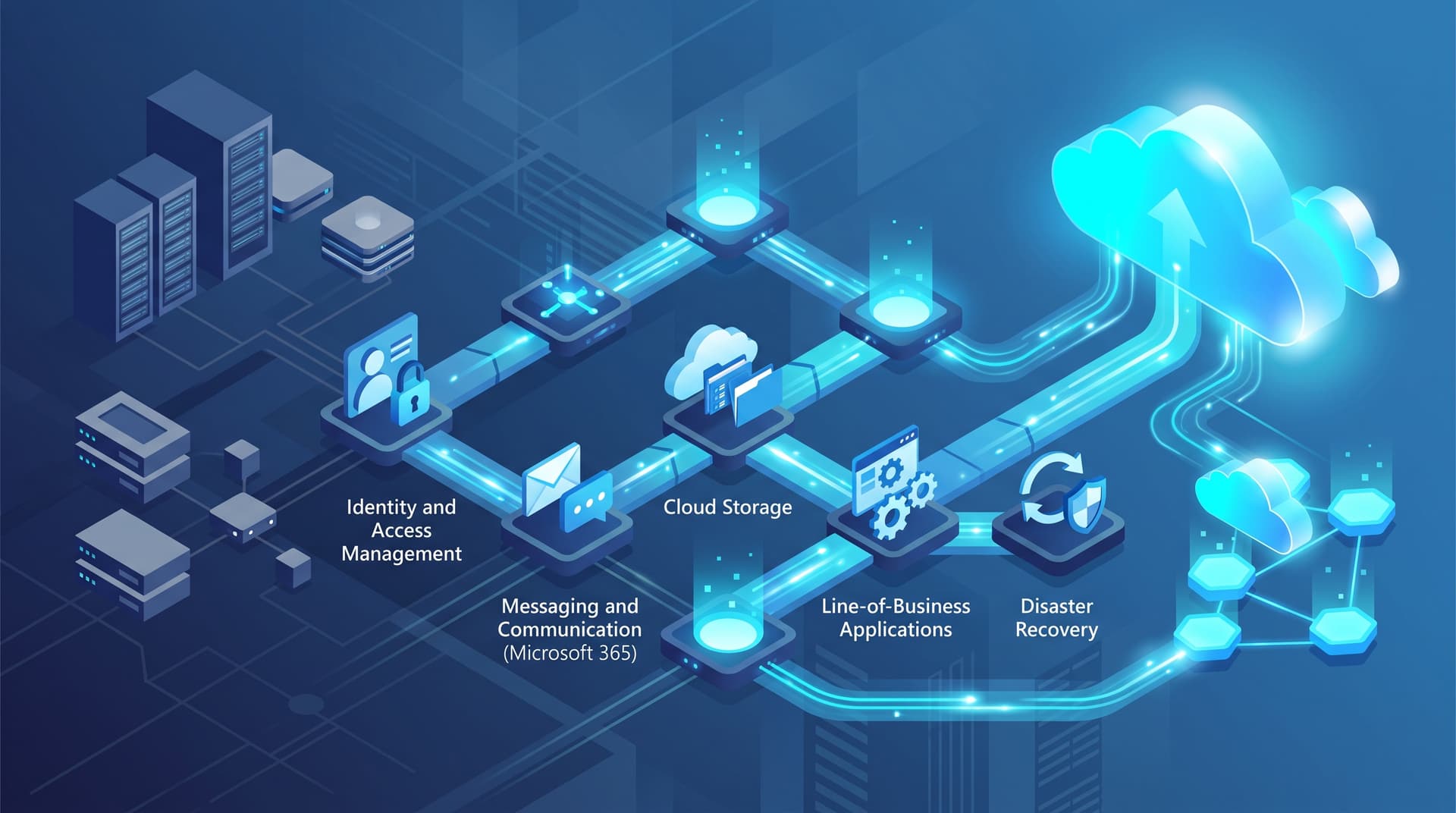
Bitscaled recommends a five-stage deployment sequence designed around foundational technology dependencies.
+-------------------------------------------------------------------------+
|                        STAGE MIGRATION SEQUENCE                         |
+-------------------------------------------------------------------------+
|  Stage 1: Identity & Authentication (Microsoft Entra ID / Directory Sync)|
|                                   |                                     |
|  Stage 2: Email & Unified Communications (Exchange Online / M365)        |
|                                   |                                     |
|  Stage 3: File Storage & Unification (SharePoint / OneDrive / Azure Files)|
|                                   |                                     |
|  Stage 4: Line-of-Business Applications (Azure IaaS / PaaS & DBs)       |
|                                   |                                     |
|  Stage 5: Disaster Recovery & Continuity (Azure Site Recovery & Backups)|
+-------------------------------------------------------------------------+
Stage 1: Identity & Authentication Foundation
Before moving data or mailboxes, establish a single source of truth for identity. This involves deploying Microsoft Entra Connect (formerly Azure AD Connect) to synchronize local Active Directory Domain Services (AD DS) with Microsoft Entra ID.
- Key Deliverables: Clean up local Active Directory user objects, enforce UPN (User Principal Name) matching with primary email addresses, implement Password Hash Sync (PHS) or Pass-Through Authentication (PTA), and enforce Multi-Factor Authentication (MFA) conditional access policies.
- Validation: Verify seamless single sign-on across cloud-native applications and validate that directory objects update without sync errors.
Stage 2: Messaging & Unified Collaboration
With identity synchronized, migrate email mailboxes, distribution lists, and shared resources to Exchange Online, followed by Microsoft Teams configuration.
- Key Deliverables: Establish hybrid Exchange transport rules, stage mailbox synchronization batches, re-point autodiscover records, and transition primary MX records to Microsoft 365 defense layers.
- Validation: Audit outbound mail flow (SPF, DKIM, DMARC), verify public folder delegation, and test desktop client connectivity across internal and remote network segments.
Stage 3: File Services & Data Unification
Transition legacy network drives (S:\, P:\) to SharePoint Online, OneDrive for Business, or Azure Files depending on file access patterns and application dependencies.
- Key Deliverables: Scan legacy shares for long file paths, invalid characters, and broken ACL permissions; execute delta syncs using the SharePoint Migration Tool or Azure Data Box; map network drives via policy or native sync clients.
- Validation: Confirm lock/unlock behavior on shared working files, verify document permission levels, and validate offline sync rules.
Stage 4: Line-of-Business (LOB) Application Migration
Migrate custom line-of-business software, ERP systems, and SQL databases to Azure Infrastructure as a Service (IaaS) virtual machines or Platform as a Service (PaaS) instances.
- Key Deliverables: Establish secure site-to-site VPN or Azure ExpressRoute connectivity, re-host or refactor SQL databases, execute application code updates to target cloud connection strings, and adjust DNS host naming.
- Validation: Perform end-to-end transaction testing, latency checks across hybrid application tiers, and multi-user concurrency testing.
Stage 5: Disaster Recovery & Continuity Validation
Once primary workloads reside in the cloud, configure automated disaster recovery, cold-site replication, and immutable backup policies.
- Key Deliverables: Implement Azure Site Recovery (ASR) for residual on-prem or multi-region workloads, establish immutable blob storage policies for backup retention, and document recovery point objectives (RPO) and recovery time objectives (RTO).
- Validation: Run isolated failover drills and verify automated recovery scripts without disrupting live operational data.
Common Hybrid Operational Pitfalls and How to Avoid Them
During the transitional hybrid state, subtle operational oversights can quietly compromise security and system reliability. Below are three frequent pitfalls encountered in SMB environments.
1. Stale Active Directory Synchronization
In a hybrid setup, synchronization health between local AD and Entra ID is critical. Stale directory synchronization occurs when directory sync services freeze, local attribute modifications fail to replicate, or duplicate object GUIDs create sync loops.
- The Risk: Terminated employees disabled in local Active Directory may retain access to cloud-only applications if sync engine errors block attribute updates. Conversely, newly provisioned staff fail to access required resources.
- Mitigation: Implement automated monitoring alerts for Entra Connect health status. Use our Microsoft 365 Security Snapshot tool to audit directory synchronization flags and detect orphaned administrative accounts.
2. Overshared M365 Permissions and Anonymous Links
When migrating files from locked-down local file servers to SharePoint Online and Teams, legacy permission structures are frequently mapped incorrectly or replaced with overly permissive tenant defaults.
- The Risk: Sensitive corporate IP, HR documentation, or financial reports become accessible tenant-wide or externally via unmonitored "Anyone with the link" sharing settings.
- Mitigation: Restrict default external sharing scopes prior to data ingestion. Apply Sensitivity Labels in Microsoft Purview to enforce encryption and access restrictions directly on sensitive files.
3. Undocumented DNS Cutovers and TTL Traps
DNS configuration underpins every cloud service cutover, from mail routing (MX, SPF, Autodiscover) to application endpoints. A common error is failing to reduce DNS Time-To-Live (TTL) values prior to a planned cutover.
- The Risk: High TTL values (e.g., 86,400 seconds / 24 hours) cause client workstations and public resolvers to cache old IP addresses long after cutover, creating split-brain conditions where half your users access the legacy server while others hit the cloud.
- Mitigation: Lower all relevant external and internal DNS record TTLs to 300 seconds (5 minutes) at least 72 hours before cutover windows. Audit your domain setup beforehand using our DNS & SSL Health Checker.
Illustrative Phased Roadmap & Risk Mitigation Matrix
The following structured execution roadmap outlines the operational phases, success metrics, and pre-planned rollback triggers required for risk-managed execution.
| Execution Phase | Focus Area | Success Metric / Milestone | Rollback Trigger | Mitigation & Emergency Control |
|---|---|---|---|---|
| Phase 1: Foundation | Identity & Network | 100% user UPN alignment; Site-to-Site VPN online | Sync loop > 5% total directory; authentication timeouts | Pause Entra Connect sync; fall back to local AD domain authentication |
| Phase 2: Messaging | Mailboxes & Routing | MX re-pointed; zero lost mail flow; client autodiscover verified | Inbound mail failure > 15 mins; widespread Outlook disconnection | Re-point MX DNS records back to legacy on-prem Exchange / Security Gateway |
| Phase 3: Storage | Files & Collaboration | Final delta sync complete; file share permissions validated | Critical file corruption; file-lock conflicts blocking operations | Re-enable read-write permissions on legacy file server shares |
| Phase 4: Applications | LOB & Database | App server latency < 30ms; DB transaction integrity verified | SQL performance degradation > 40%; failed app authentication | Re-route internal DNS hostnames to local legacy application servers |
| Phase 5: Decommission | Legacy Hardening | Server demotion; legacy storage scrubbed; DR validated | Unforeseen dependency failure on legacy infrastructure | Restore VM from pre-demotion snapshot; audit residual service traffic |
Takeaway: Never begin a migration phase without an explicit, time-bounded rollback trigger. If a critical milestone fails during the cutover window and cannot be resolved within the allocated troubleshooting buffer, execute the rollback immediately.
Pre-Cutover Risk Controls & Rollback Readiness Checklist
Before initiating any live production cutover, complete this operational safety checklist:
- Pre-Lowered TTLs: Internal and external DNS TTLs reduced to 300 seconds 72 hours prior to execution.
- Full Offline Backups: System-state backups and database dumps taken immediately prior to starting the cutover window and stored in isolated storage.
- Break-Glass Administrative Access: At least two cloud-only Global Admin accounts created with long passwords, stored in a secure vault, and exempted from standard conditional access rules to prevent lockout during identity changes.
- Documented Service Endpoints: Complete inventory of all hardcoded IP addresses, internal hostnames, and service account dependencies used by legacy devices (copiers, scanners, legacy script hosts).
- Communication Strategy: Pre-drafted internal status communications sent to key stakeholders, including helpdesk escalation channels and technical contact paths.
Modernize Your Cloud Infrastructure with Bitscaled
Executing a seamless transition to Microsoft 365 and Azure requires architecture-level planning, precise dependency management, and disciplined risk mitigation. Avoid costly downtime and operational blind spots by working with experienced cloud engineering specialists.
Bitscaled provides end-to-end cloud infrastructure management, migration execution, and post-cutover operational support tailored to growing businesses.
Ready to map your organization's cloud journey? Schedule a cloud readiness review with Bitscaled before your next migration phase.