Migrating mid-market and small-to-medium business (SMB) infrastructure to the cloud is rarely a single overnight event. For most organizations, maintaining business continuity during modernization requires a hybrid approach where legacy on-premises assets coexist alongside cloud environments. However, without a disciplined architectural sequence, hybrid migrations frequently stall due to authentication loops, permissions creep, uncoordinated cutovers, and broken line-of-business (LOB) dependencies.
At Bitscaled Cloud Infrastructure Services, we consistently observe that successful cloud migrations stem from rigorous dependency mapping rather than aggressive timelines. Migrating workloads out of sequence introduces compounding technical debt and creates significant operational friction for internal IT teams. By establishing a proven five-stage migration sequence and actively mitigating hybrid operational risks, SMB IT managers can execute predictable, zero-downtime cutovers that elevate organizational security and agility.
The Five-Stage Migration Sequence
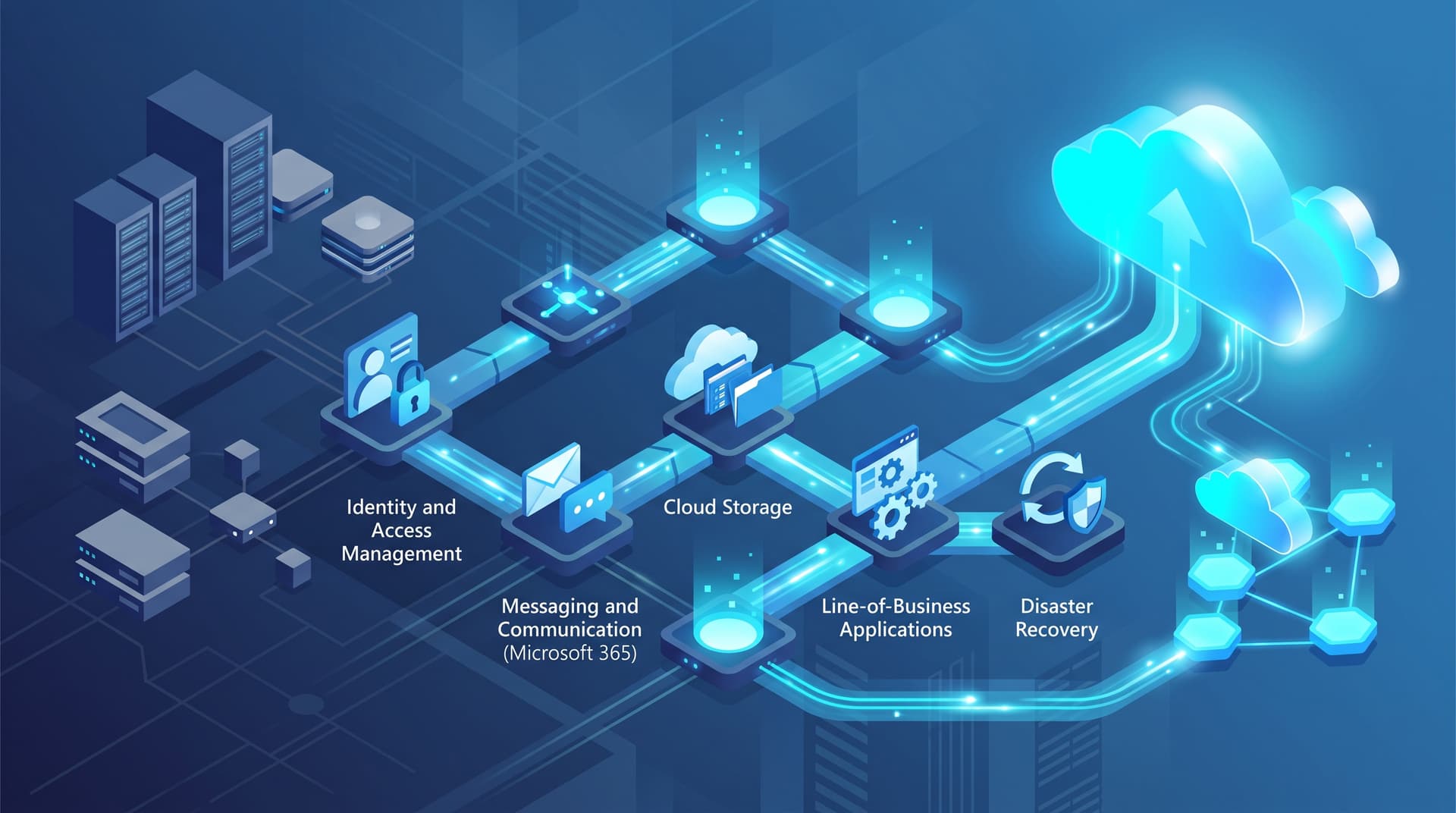
To prevent structural dependencies from collapsing during transition, cloud cutovers must follow a strictly ordered lifecycle. Executing workload shifts out of order—such as moving line-of-business application databases before establishing identity integration—inevitably leads to broken access controls, performance bottlenecks, and user lockouts.
+-------------------------------------------------------------------+
|                     THE 5-STAGE MIGRATION SEQUENCE                |
|                                                                   |
|  [Stage 1]  --->  [Stage 2]  --->  [Stage 3]  --->  [Stage 4]  --->  [Stage 5]
|  Identity         Messaging &      Cloud File          Line-of-Business  Disaster Recovery
|  Foundation       Collaboration    Storage             Applications      & Continuity
+-------------------------------------------------------------------+
Stage 1: Identity Foundation
Identity is the control plane of modern cloud architecture. Before shifting mailboxes or application data, organizations must establish Entra ID (formerly Azure AD) synchronization with on-premises Active Directory Domain Services (AD DS). This stage involves:
- Active Directory Remediation: Cleaning up duplicate accounts, stale Security Identifiers (SIDs), missing user principal names (UPNs), and non-standard organizational units (OUs).
- Hybrid Identity Deployment: Configuring Microsoft Entra Connect or Entra Cloud Sync with Password Hash Synchronization (PHS) or Pass-Through Authentication (PTA) to ensure frictionless single sign-on (SSO).
- Zero Trust Baseline: Enforcing Conditional Access policies, Multi-Factor Authentication (MFA), and role-based access control (RBAC) prior to introducing sensitive cloud repositories.
Stage 2: Messaging and Collaboration
With directory synchronization stabilized, email and tenant collaboration represent the lowest-risk operational workloads to migrate. Moving messaging early builds user familiarization with cloud authentication patterns while decoupling core communications from local server hardware. Key steps include:
- Executing hybrid Exchange deployments or staging Cutover/Minimal Hybrid migrations for Microsoft 365.
- Transitioning MX records, setting up AutoDiscover records, and updating SPF, DKIM, and DMARC parameters to protect domain reputation.
- Migrating historical distribution lists and shared mailboxes to Microsoft 365 Groups or Teams channels.
Stage 3: File Services and Content Repositories
Legacy file servers are often burdened by decades of unstructured file growth, complex NT File System (NTFS) permission trees, and hardcoded local pathing. Moving file services to cloud storage platforms like SharePoint Online, OneDrive for Business, or Azure Files requires:
- Data Discovery and Sanitization: Identifying redundant, obsolete, and trivial (ROT) data to minimize migration volume and storage overhead.
- Permission Mapping: Translating deep NTFS inheritance rules into flat, group-driven cloud access models.
- Path Standardisation: Mitigating file path character limits and breaking dependencies on local drive mapping letters (e.g.,
Z:\ Drive) by leveraging Microsoft Azure Files or sync clients.
Stage 4: Line-of-Business (LOB) Applications
Database-backed line-of-business applications, Enterprise Resource Planning (ERP) tools, and proprietary software represent the highest risk tier in any cloud project. Migrating LOB systems demands careful consideration of network latency, data tier dependencies, and user access patterns:
- Lift-and-Shift vs. Replatforming: Evaluating whether to re-host server virtual machines directly in Azure IaaS or modernize the application tier using PaaS services such as Azure SQL Managed Instances and Azure App Services.
- Latency Optimization: Keeping application servers and their underlying databases within the same Azure availability zones to maintain low sub-millisecond query response times.
- Secure Application Publishing: Utilizing Entra ID Application Proxy or Azure Virtual Desktop (AVD) to grant secure remote application access without exposing internal ports to the public internet.
Stage 5: Disaster Recovery and Long-Term Resiliency
The final phase solidifies the cloud environment's resilience. Once primary workloads operate in Azure or SaaS platforms, business continuity plans must be re-architected:
- Implementing Azure Site Recovery (ASR) for hybrid workloads or cross-region cloud replication.
- Securing immutable cloud-native backups for Microsoft 365 data and Azure virtual machines to protect against ransomware and accidental deletion.
- Running automated failover simulations to validate Recovery Time Objectives (RTO) and Recovery Point Objectives (RPO).
Navigating Common Hybrid Pitfalls
While the migration sequence provides a structural path forward, operational blind spots during hybrid operations can compromise productivity and security. IT leaders must proactively defend against three pervasive hybrid hazards.
Pitfall 1: Stale Active Directory Synchronization
In a hybrid Microsoft 365 setup, directory synchronization is a continuous lifecycle process. Over time, drift between on-premises Active Directory and Entra ID leads to critical administrative failures:
- Orphaned Objects and Sync Loops: Inactive, deleted, or unlinked local AD accounts cause synchronization errors, leaving phantom objects active in Microsoft 365 or blocking new user provisioning.
- OU Scope Drift: Unintentional movement of active user objects outside of synchronized Organizational Units (OUs) can silently trigger account soft-deletions in the cloud, suddenly revoking access to mailbox and SharePoint resources.
- Mitigation Strategy: Implement daily synchronization health auditing and leverage automated directory health reporting. Evaluate your cloud tenant identity posture using the Bitscaled Microsoft 365 Security Snapshot to identify orphan accounts and privilege escalations early.
Pitfall 2: Overshared Microsoft 365 Permissions
Moving legacy file shares directly to SharePoint Online without redesigning governance models usually results in excessive data exposure. Users frequently overshare sensitive folders via anonymous or tenant-wide guest links:
- Inheritance Traps: Applying broad "Everyone except external users" access rules leads to internal data spillage where confidential financial or operational data becomes searchable across Microsoft Search and Delve.
- Guest Lifecycle Neglect: Unmonitored external sharing invites guests into Teams or SharePoint sites without automated expiration schedules.
- Mitigation Strategy: Enforce external sharing boundaries, apply Purview sensitivity labels, and run routine access reviews across all cloud repositories.
Pitfall 3: Undocumented and Uncoordinated DNS Cutovers
DNS cutovers represent the final pivot point for mail, web services, and application pathways. Flawed DNS configurations remain the leading cause of post-migration downtime:
- TTL Mismanagement: Failing to lower DNS Time-To-Live (TTL) values weeks prior to migration forces clients to cache legacy IP addresses long after the cloud cutover occurs.
- Split-Brain DNS Discrepancies: Internal DNS servers failing to resolve external cloud endpoints correctly, leading to connection timeouts for on-premises staff.
- Mitigation Strategy: Document every DNS record, TTL, and dependent service beforehand. Use external network verification tools such as the Bitscaled DNS & SSL Health Check to validate global propagation and certificate binding prior to flipping primary records.
Phased Implementation Roadmap & Rollback Strategy
A structured roadmap ensures clear operational alignment between internal IT, executive leadership, and service partners. Below is a practical execution matrix for hybrid cloud transitions.
Migration Phase Roadmap
| Phase | Core Focus | Key Workloads | Critical Milestones | Target Success Criteria |
|---|---|---|---|---|
| Phase 1 | Identity & Security Baseline | Entra ID Sync, Conditional Access | AD cleanup, Entra Cloud Sync deployment, MFA rollout | Zero sync errors; 100% user MFA coverage |
| Phase 2 | Messaging & Collaboration | Exchange Online, Teams | Mailbox migration, SPF/DKIM/DMARC updates | Seamless mail flow; legacy server decommissioned |
| Phase 3 | File Data Modernization | SharePoint Online, Azure Files | ROT cleanup, permission mapping, data sync | Flat permissions structure; local shares set to read-only |
| Phase 4 | LOB Application Shift | Azure Virtual Machines, Azure SQL | Staging environment seeding, application proxy cutover | Latency within operational SLA; full app validation |
| Phase 5 | Disaster Recovery & Governance | Azure Site Recovery, Cloud Backup | Runbook execution, automated DR test | Validated RTO < 4 hrs; immutable backups verified |
Engineering for Rollback: Risk Mitigation Standard Operating Procedures
Every migration phase must feature an explicit, tested rollback strategy. Migration teams must never proceed without a functional emergency return path:
- Database Delta Logging: When executing LOB database cutovers, maintain dual-write or transactional log shipping back to the legacy host until post-cutover validation sign-off is completed.
- DNS Snapshot & TTL Pre-Reduction: Set TTLs to 300 seconds (5 minutes) at least 72 hours prior to cutover. Keep exact zone file exports readily available to execute instantaneous DNS rollbacks if routing anomalies occur.
- Immutable Host Snapshots: Capture full off-line machine snapshots of local domain controllers, file servers, and application servers prior to schema changes or directory sync installation.
Takeaway: Cloud migration success is defined by workload dependency ordering, continuous identity health, and automated rollback readiness—not speed alone.
Executing Your Next Migration Phase with Bitscaled
Navigating complex hybrid operations requires specialized cloud architecture expertise. Whether your enterprise is establishing its initial Entra ID footprint, modernizing legacy file systems, or re-architecting line-of-business applications in Azure, Bitscaled delivers end-to-end guidance and hands-on execution.
Our engineers inspect your hybrid infrastructure, eliminate security misconfigurations, and build deterministic cutover plans tailored to your operational requirements. Explore our comprehensive Bitscaled Cloud Infrastructure Services or get in touch with our engineering team today.
Ready to eliminate migration risks and secure your hybrid environment? Schedule a cloud readiness review with Bitscaled before your next migration phase.